Fixed Mount Linear Imager
Cino FM-480 USB Fixed Mount Linear Barcode Scanner
Five operating modes, an external trigger, a serial trigger you define yourself, and separate OK and NG signals. A scanner meant to be driven by a machine rather than by a person.
5 operating modesExternal triggerSerial triggerOK / NG signalsTest modeIP54
A handheld scanner has one job: read when somebody pulls the trigger. A fixed mount scanner has a harder one, because there is nobody there. It has to know when to look, what to do when the read fails, and how to tell the rest of the machine what happened. That is the part of the FM-480 worth paying attention to. It offers five distinct operating modes, accepts a trigger from your hardware or from a serial command you write yourself, and reports success or failure on separate OK and NG signals so the surrounding equipment can act without reading a single character of data. The optical and physical figures are in the specifications below.
How it decides when to read
Trigger modeThe module reads while a trigger signal is held and stops when it is released. The usual choice where a sensor or a button upstream knows an item has arrived.
Level modeA single trigger pulse starts a read attempt that continues until a code is decoded or the attempt times out, which suits a hardware sensor that only fires once.
Alternative modeA trigger starts the read and the next trigger stops it, so a latching switch or a software toggle can hold the scanner on for a whole operation.
Presentation modeThe module watches for a change in front of the window and reads on its own. This is the mode for lockers and counters where nothing upstream can tell it an item is there.
Force modeThe illumination stays on and the engine reads continuously, used where throughput matters more than power or lamp life.
Serial trigger commandsYou define the command string, so an existing host program can drive the scanner without being rewritten around a vendor protocol.
Signals the machine can act on
Separate OK and NG outputs report a good read and a failed one as signals rather than as characters in a data stream. That distinction matters in automation: a conveyor can divert an unread carton, a locker can refuse to open, a lamp can go amber, and none of it requires software to parse the barcode and work out whether anything arrived.
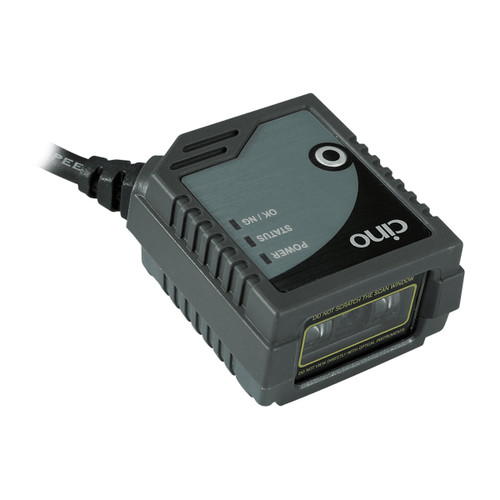
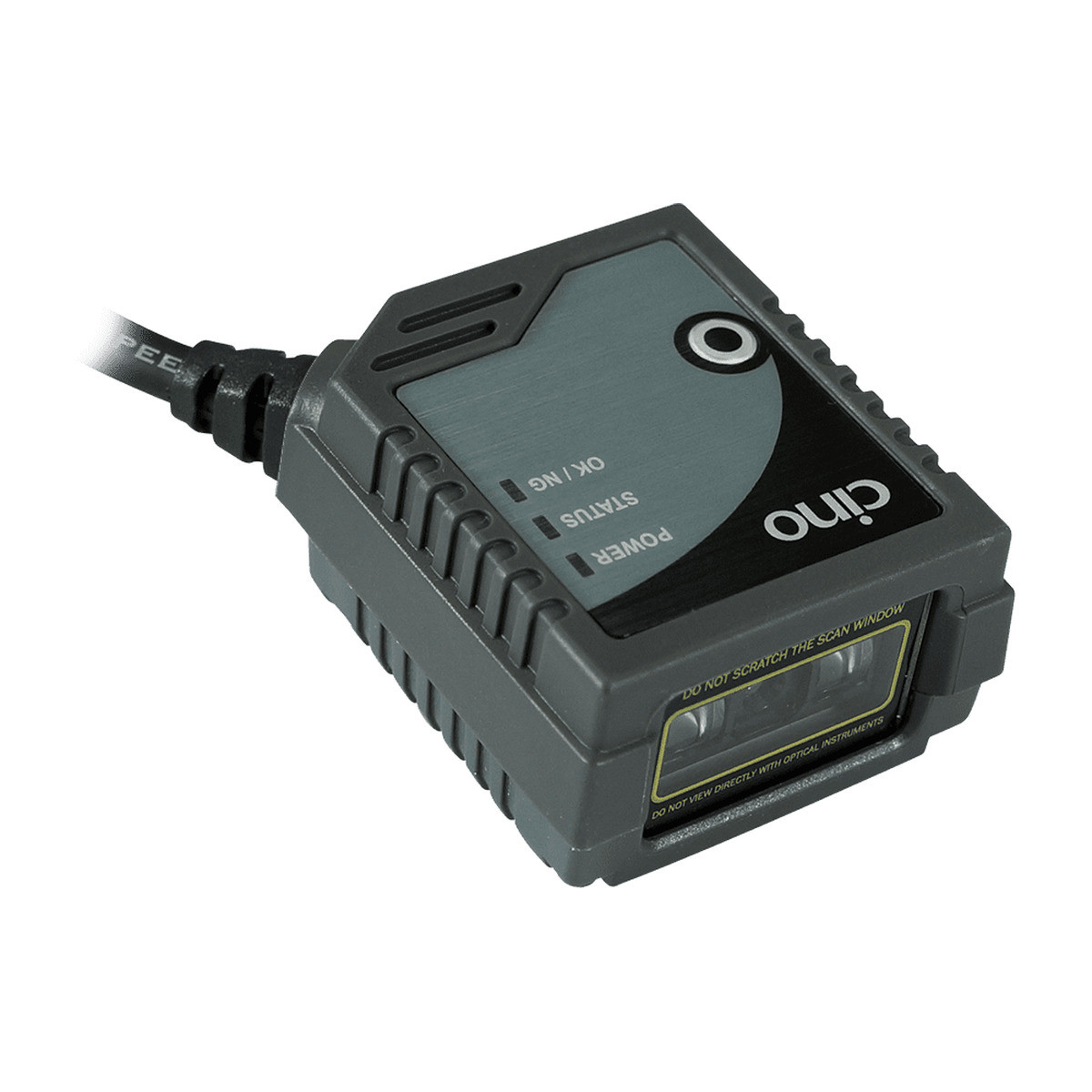
The same three indicators are mirrored on the face of the module as POWER, STATUS and OK/NG lamps, so a technician standing at the machine can see what the host is seeing.
Commissioning by measurement
The test button on the module puts it into a mode where it scans repeatedly and reports the proportion of successful reads. Mount it, run the test, move it, run it again, keep the position with the better number.
This is the difference between an install that works and one that works until the first marginal label. A scanner reading 60 percent of the time looks identical to one reading 100 percent of the time until the day it matters, and the test ratio is how you tell them apart before you close the panel.
Fitting it into an existing system
- Decide what tells it to read. An existing proximity sensor, a PLC output, a software command or the scanner's own presentation mode. This choice sets the operating mode and usually the wiring.
- Decide what listens to the result. If the machine only needs the barcode, USB keyboard output is enough. If it needs to react to a failed read, wire the NG signal.
- Shape the data before it leaves. DataWizard Condensed and DataWizard Premium can strip, pad, reorder and insert characters, which keeps existing host software untouched when a supplier changes a label format.
- Prove the position. Run the test mode before the panel goes back on, and record the read ratio so a future fault can be compared against a known good number.
The five operating modes side by side
| Mode | Starts reading when | Stops when | Suits |
|---|
| Trigger | A trigger signal is applied | The signal is released | A sensor or button upstream |
| Level | A single trigger pulse arrives | A code is read or it times out | One shot hardware sensors |
| Alternative | A trigger is applied | The next trigger is applied | Latching switches and software toggles |
| Presentation | Something changes in front of the window | The read completes | Lockers and unattended counters |
| Force | Power is applied | Power is removed | High throughput lines |
All five are set by configuration barcode, serial command or FuzzyScan PowerTool, so the mode can be changed after installation without replacing the hardware.
Full specifications
| Brand | Cino |
| Series | FuzzyScan FM-480 |
| Part number | PCW-FM480-11F |
| Product type | Fixed mount linear imaging scanner, front scan window |
| Optical system | High performance linear imaging engine |
| Light source | 630 nm visible red LED |
| Minimum resolution | Typical 3 mil, Code 39 at PCS 0.9 |
| Reading range | Up to 24 inches on 100 percent UPC/EAN, up to 34 inches on 20 mil Code 39 |
| Depth of field | More than 3 inches on a 3 mil barcode |
| Print contrast | 20 percent minimum reflective difference |
| Scan rate | Dynamic scanning rate up to 500 scans per second |
| Reading direction | Bi-directional, forward and backward |
| Pitch, skew, tilt | Plus or minus 65 / 65 / 55 degrees |
| Operating modes | Trigger, Alternative, Level, Force and Presentation |
| Host interface | USB HID keyboard and USB COM port emulation on this part number |
| Trigger options | External trigger and user definable serial trigger command |
| Output signals | OK and NG signals for reading control |
| User interface | 3 LEDs for power, status and OK/NG. Test button. Programmable beeper |
| Configuration | Command barcodes, serial commands, FuzzyScan PowerTool |
| Data editing | DataWizard Condensed and DataWizard Premium |
| 1D symbologies | Code 39, Code 39 Full ASCII, Code 32, Code 39 Trioptic, Code 128, GS1-128, Codabar, Code 11, Code 93, Standard and Industrial 2 of 5, Interleaved and Matrix 2 of 5, German Post, China Post, IATA, UPC/EAN/JAN with addendum, Telepen, MSI/Plessey and UK/Plessey, GS1 DataBar linear and linear stacked |
| Stacked symbologies | PDF417, Micro PDF417, Codablock F, Composite Codes |
| Dimensions | 47.6 mm (L) x 40.6 mm (W) x 23.1 mm (D) |
| Weight | 95 g on the USB version |
| Scan window | Front facing on this part number. Cino also builds a side window version. |
| Connector | USB 4 pin Type A |
| Mounting | 2 screw holes, M3 by 4 mm depth |
| Input voltage | 5V DC plus or minus 10 percent |
| Current | Typical 165 mA operating, 70 mA standby at 5V DC |
| Drop specification | Withstands drops from 1.5 m to concrete |
| Environmental sealing | IP54 |
| Operating temperature | -10 C to 50 C |
| Storage temperature | -40 C to 70 C |
| Humidity | 5 to 95 percent relative, non condensing |
| Ambient light immunity | 0 to 100,000 lux |
| ESD protection | Functional after 15KV discharge |
| Compliance | CE, FCC, BSMI, VCCI, KC. LED eye safety IEC62471 Exempt Group. RoHS. |
| Warranty | 24 Months Return to Base |
Before you order
- Confirm the symbology. This is a linear imager. It reads 1D and stacked linear codes such as PDF417 and GS1 DataBar Stacked, and it does not read QR or Data Matrix. Ask us about the Cino FA-480 if you need those.
- Work out the trigger source. The operating mode follows from what tells the scanner an item has arrived. Describe the machine and we will tell you which mode to order it configured in.
- Check the mechanical fit. 47.6 by 40.6 by 23.1 mm, two M3 holes at 4 mm depth, front window, USB cable from the rear. Settle the cut out and the cable route before the order.
- Allow for alignment time. Budget an hour on site for test mode and adjustment on a first installation. Every one after that is faster because you already know the geometry.
In the box
- Cino FM-480 fixed mount linear scanner, front window
- Attached USB interface cable, 4 pin Type A
- Quick start guide
Frequently asked questions
Can my software tell it when to scan?
Yes. The FM-480 accepts a serial trigger command whose string you define, which means an existing host program can drive it without being rebuilt around a vendor protocol. There is also a hardware external trigger input if the signal is coming from a sensor rather than from software.
What does the NG signal actually do?
It reports that a read attempt failed. Wired into a PLC or a controller it lets the machine respond, by diverting an item, holding a door shut or raising an alarm, without your software having to detect the absence of data and guess at a timeout.
Which operating mode should we order?
It depends on what tells the scanner an item has arrived. Presentation mode suits an unattended window with nothing upstream. Trigger and Level suit a sensor. Alternative suits a latching switch. Tell us how the machine works and we will set it before despatch.
Can the mode be changed later?
Yes, by configuration barcode, by serial command or through FuzzyScan PowerTool. Nothing about the mode is fixed in the hardware, so a change of process does not mean a change of scanner.
Does it work without a computer?
It needs 5V DC and something to receive the data, but the OK and NG signals mean a simple controller is enough for a go or no go application. A full PC is only needed where the barcode content itself matters.
How do we prove it is aimed properly?
The test button runs repeated scans and reports the percentage that succeeded. Record that figure at commissioning and you have a baseline to compare against if reads start failing a year later.
Is it sealed well enough for a production floor?
IP54 covers dust and splashing water from any direction, which suits food preparation, packing and workshop environments. It is not rated for pressure washing or immersion, so a wash down line needs a different class of enclosure.
What is covered by the warranty?
A 24 Months Return to Base term on the module. Return to base means it comes back to us for assessment and repair or replacement, dealt with in Australia rather than through an overseas returns process.
Integrating more than oneOn a multi station installation we can supply the modules pre configured to the same operating mode and data format, so each one is identical out of the box. Send us the station layout and the label sample and we will put the configuration together before despatch.
Cino FM-480 fixed mount linear imaging scanner, front window, USB, covered by a 24 Months Return to Base warranty. Supplied and supported in Australia by POS Sales, 1300 026 062.
Part number PCW-FM480-11F. Linear imaging engine reading 1D and stacked linear codes, 47.6 x 40.6 x 23.1 mm, 95 g, sealed to IP54.

 1300 026 062