The printer collects its own orders from your cloud software, so nothing in the venue has to be left running for a docket to reach the kitchen.
76mm bond paper9-pin impact dot-matrixUp to 8.9 lines/secCloudPRNT / WebPRNTTwo-colour (red/black)Auto-cutter
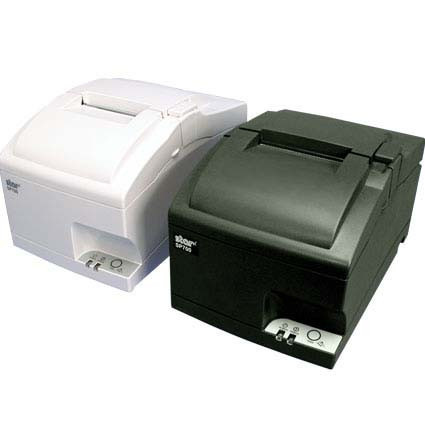
The Star SP742 CloudPRNT is the same 9-pin impact kitchen printer as the rest of the SP700 range, with one difference that matters more than any specification on the page. It supports Star CloudPRNT, which means the printer reaches out to a web address and collects whatever is waiting rather than sitting there hoping something on the local network sends it a job. If your POS lives in a browser, or your orders arrive from a delivery platform, that is the difference between a printer that works and one that needs a computer babysitting it.
Why choose the SP742 CloudPRNT
The printer asks, the server answers CloudPRNT turns the usual arrangement around. Instead of your software pushing a job at the printer, the printer polls a web address and collects whatever is waiting. That one change is what makes it work with cloud software.
No PC in the middle There is no print server, no driver on a back office machine and nothing that has to be left switched on. The printer, the network and the internet connection are the whole of it.
Works behind the router Because the printer reaches out rather than being reached, orders arrive without port forwarding, a fixed external IP or a VPN back to the venue. That removes the part of a cloud rollout that usually needs the network company.
Keeps printing when the tablet sleeps An order taken online lands in the kitchen whether or not anyone is holding the POS tablet, because the job never passes through it.
Still an ordinary kitchen printer Underneath it is the same 9-pin impact mechanism on plain bond paper, two colour with the RC700BR ribbon, auto cutter and splash resistant body as the rest of the SP700 range.
WebPRNT as well Alongside CloudPRNT it supports Star's WebPRNT, so a browser based POS can print to it directly from the page without an installed client.
8.9
lines/sec print speed
9-pin
impact dot-matrix head
22M
lines reliability (MCBF)
3-ply
copies in one pass
Orders without a PC in the middle
A traditional kitchen printer needs something on site to drive it: a till, a server, or a machine running a print service. That is fine until the software moves to the cloud, at which point the thing in the middle becomes the thing that breaks, and it is always discovered during a rush. CloudPRNT removes it. The printer is given an address, it checks in on a schedule, and it prints what it finds. Setup is a network cable and a configuration page, and once it is done the venue has no local moving parts to maintain.
Specifications
Brand / Model
Star Micronics SP742 CloudPRNT (SP742MO2X)
Print method
9-pin impact dot matrix
Print speed
Up to 8.9 lines/sec
Colour printing
Two-colour (black/red) with RC700BR ribbon
Paper
Plain bond paper roll, 76 mm (3-inch); up to 42 columns
Copy capability
Up to 3-ply (original plus copies)
Ribbon
Star RC700B (black) / RC700BR (black/red), available separately
Power supply with the internal supply and universal cable
Documentation
Note: a ribbon is not included, order an RC700B or RC700BR separately
Frequently asked questions
What is CloudPRNT, in plain terms?
It is a way for the printer to fetch its own work. The printer is given a web address and it checks that address every few seconds for anything waiting to print. Normal printing works the other way round, with software finding the printer and sending it a job, which is the part that breaks when the software lives on someone else's server rather than on your counter.
Do I still need a computer or a print server on site?
No. That is the point of it. The printer needs power, a network cable and an internet connection, and nothing else has to be running in the venue. There is no driver to install and no back office machine that has to stay awake.
Will it work with my ordering platform or cloud POS?
It works with any system that supports Star CloudPRNT, and a good many hospitality and ordering platforms do. The honest answer is that it depends on your software, so tell us what you run and we will check it before you order rather than after.
How is this different from the Ethernet SP742?
The hardware is the same printer. The Ethernet model expects your POS to be on the same network and to send it jobs. This one can also collect jobs from a server out on the internet, which is what you need when the POS is a browser tab or an app rather than a machine in the building.
Does it need port forwarding or a fixed IP address?
No, and that is worth knowing before you involve a network company. Because the printer starts the conversation, the traffic goes outward through the router the same way a laptop browsing a website does.
Can it still print from a local POS as well?
Yes. It sits on your network like any Ethernet printer and understands the usual Star and ESC/POS commands, so a local till can drive it directly while the cloud side handles online orders.
Why an impact printer rather than a thermal one?
Heat and steam are the reason. A thermal docket darkens and curls above a grill or next to a pass, while impact printing puts ink on plain bond paper and stays readable. Impact is also the only way to get carbon copies, which is why dry cleaners and workshops use it.
What paper and ribbon does it take?
76 mm plain bond rolls, not thermal paper, and a Star RC700 ribbon. RC700B prints black, RC700BR prints black and red so new or priority lines can stand out. Both are ordered separately and both are on this page as add-ons.
Application use cases
Online ordering and delivery: orders from a web platform land in the kitchen directly, without anyone watching a tablet
Cloud POS venues: where the till is a browser tab or an app and there is no server in the building to print through
Multi site operators: each venue needs a printer and an internet connection, not a local IT setup repeated site by site
Kitchens, bars and pass counters: the same heat tolerant two colour dockets the rest of the SP700 range is bought for
Do not forget your consumables
The SP742 needs a Star RC700 ribbon (RC700BR for two colour black and red) plus 76 x 76 mm plain bond rolls, both ordered separately. It does not use thermal paper. Both are on this page as add-ons.
The Star SP742 CloudPRNT (SP742MO2X-GRY) is a 9-pin impact receipt and kitchen printer with an auto cutter, two colour printing on 76 mm plain bond paper, up to 3-ply copies and a 22 million line reliability rating. It connects over Ethernet and supports Star CloudPRNT and WebPRNT, so it can collect print jobs from cloud based software without a local print server. Covered by a 24 Months Return to Base warranty. Supplied and supported in Australia by POS Sales, 1300 026 062.
Star Micronics SP742 CloudPRNT · SP742MO2X-GRY · 9-pin impact dot-matrix · auto-cutter · two-colour · 76 mm bond paper · CloudPRNT and WebPRNT

 1300 026 062