Wi-Fi Scanner with Display
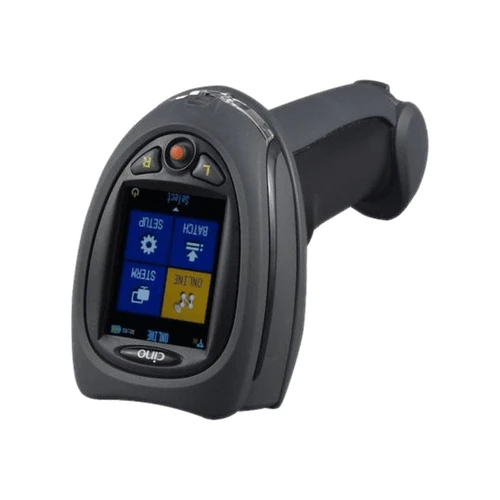
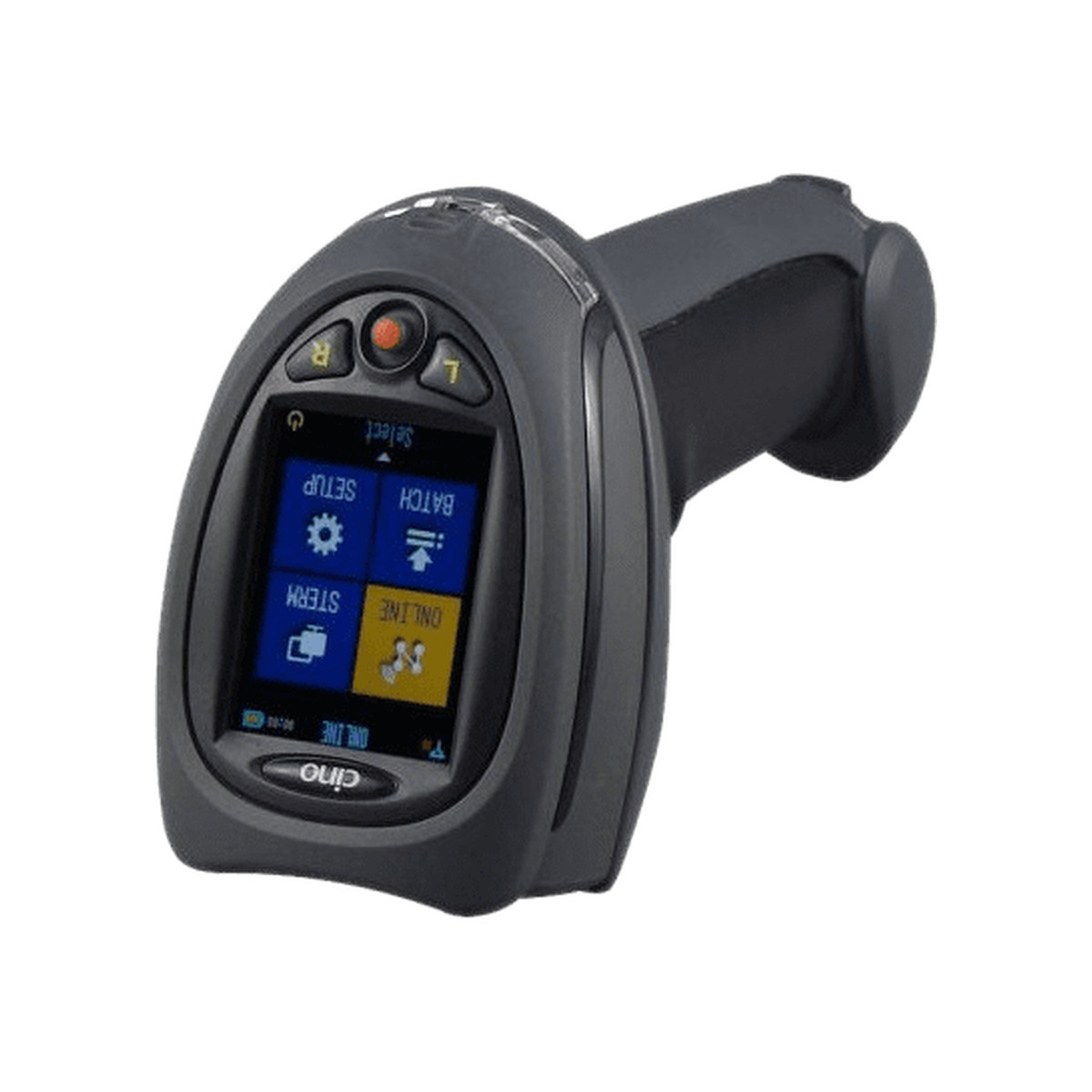
Cino FuzzyScan F790WD Wi-Fi Barcode Scanner with Colour Display
Three operating modes, user defined forms with multiple fields, host acknowledgement on every read, and a colour screen to show the operator what the host said back.
ONLINE modeBATCH modeSTERM modeMulti field formsHost acknowledgementWaveCentre
Most cordless scanners send a string of characters and hope. The F790WD was designed around the opposite assumption: that the interesting part of a scan is what happens to the data afterwards, and that the operator holding the scanner deserves to know. It runs three distinct data modes, carries user defined forms with more than one field, can require the host to acknowledge a transmission before the scanner accepts it as sent, and has a two inch colour screen to report all of it. Cino's WaveCentre software on the host side will write the results straight to a csv or text file if there is no application waiting for them. The optical and radio figures are in the specifications below.
Three ways to handle a read
ONLINE, sent as it happensEach barcode is decoded and transmitted to the host immediately over Wi-Fi. This is the mode for live checks: stock lookups, goods receipting, anything where the answer has to come back now.
ONLINE with acknowledgementThe host confirms receipt before the scanner treats the read as sent. Without that, a transmission lost to a dropped association looks exactly like a successful one to the person holding the scanner.
BATCH, collected and sent laterReads are written to the scanner's own memory and transmitted in one pass afterwards. The network is not needed during the work, which is what makes a stocktake across a whole site practical.
STERM, a conversationFull two way interaction between the scanner and a host application, so the host can push a prompt, a quantity request or an error back to the screen in the operator's hand.
Forms with more than one fieldBoth ONLINE and BATCH support user defined forms, so one operation can capture a location, a part and a quantity as separate fields rather than as one run on string.
Straight to a fileCino's WaveCentre on the host will save everything it receives as csv or text, which is often all a site needs and avoids writing software around the scanner at all.
The screen is the point
A two inch QVGA colour display, two function keys and a five way navigation pad turn a scanner into something an operator can work from. The screen shows which field of a form is being filled, whether the last transmission was acknowledged, and in STERM mode whatever the host application chooses to send back.
It also carries a virtual keyboard. When a label is torn, smudged or simply missing, the operator types the number there and then. The alternative is a biro, a scrap of paper and an hour of someone's afternoon a week later.
Charging and running it
Power comes from a 3.7V 2600 mAh lithium ion pack, which Cino rates at four to five hours for a full charge. Runtime depends heavily on the mode, because a scanner holding an association and transmitting on every read works the radio far harder than one collecting a batch with the radio idle.
Cino lists a charging cradle, a USB cable and a 5V DC power supply for this family. Tell us how the unit will live on your site, in a cradle at a desk or on a charger in a vehicle, and we will confirm the parts on the quote.
Setting one up for a job
- Join it to the network. Infrastructure mode against your existing access points, with WEP, WPA or WPA2. Ad-hoc is available where there is no infrastructure, but it supports WEP only.
- Choose the mode for the task. ONLINE where the answer matters immediately, BATCH where coverage is unreliable or the work is a count, STERM where the host has something to say back.
- Define the form. Lay out the fields the operation actually needs, in the order the operator will work in. A form that matches the job is the difference between one scan per item and three.
- Decide what receives it. An existing host application, or WaveCentre writing csv or text files. The second option is often enough and takes a development project off the table.
Which mode suits which job
| Mode | Network needed | Data arrives | Typical job |
|---|
| ONLINE | Yes, during the work | Immediately, read by read | Receiving, despatch, live lookups |
| ONLINE with acknowledgement | Yes, during the work | Immediately, confirmed by the host | Anything where a lost read costs money |
| BATCH | Only at the end | In one transmission afterwards | Stocktakes and audits across a site |
| STERM | Yes, during the work | Immediately, with a reply to the screen | Guided picking and validation against a host |
The mode is part of the configuration rather than the hardware, so one scanner can be set up differently for a stocktake weekend and put back afterwards.
Full specifications
| Brand | Cino |
| Series | FuzzyScan F790WD |
| Part number | PCW-F790WD-BVG |
| Product type | Wi-Fi handheld linear imaging scanner with colour display |
| Optical system | Linear imaging engine |
| Light source | 630 nm visible red LED with a bright aiming line |
| Print contrast | 10 percent minimum reflective difference |
| Minimum resolution | Typical 3 mil, Code 39 at PCS 0.9 |
| Working distance | More than 24 inches on 100 percent UPC/EAN symbols |
| Scan rate | Dynamic scanning rate up to 500 scans per second |
| Reading direction | Bi-directional, forward and backward |
| Pitch, skew, tilt | Plus or minus 65 / 65 / 55 degrees |
| Operating mode | Trigger |
| Display | 2 inch QVGA colour display with backlight |
| Keypad | 2 function keys and one 5-way navigation key |
| User indications | Blue link indicator, 2 colour status indicators, programmable beeper and vibrator |
| Radio standard | IEEE 802.11 b/g |
| Radio frequency | Country dependent, typically 2.4 to 2.5 GHz |
| Radio operating modes | Infrastructure mode and Ad-hoc mode |
| Communication range | More than 150 metres in open space |
| Security | WEP, WPA and WPA2. Ad-hoc mode supports WEP only. |
| Data operating modes | ONLINE, BATCH and STERM |
| Host software | Cino WaveCentre |
| Battery | 3.7V 2600 mAh Li-ion rechargeable |
| Battery charge time | Approximately 4 to 5 hours per full charge |
| 1D symbologies | Code 39, Code 39 Full ASCII, Code 32, Code 39 Trioptic, Code 128, GS1-128, Codabar, Code 11, Code 93, Standard and Industrial 2 of 5, Interleaved and Matrix 2 of 5, German Post, China Post, IATA, UPC/EAN/JAN with addendum, Telepen, MSI/Plessey and UK/Plessey, GS1 DataBar linear and linear stacked |
| Stacked symbologies | PDF417, Micro PDF417, Codablock F, Composite Codes |
| Dimensions | 95.0 mm (L) x 70.5 mm (W) x 160.5 mm (D) |
| Weight | 211 g, battery included |
| Colour | Black |
| Drop specification | Withstands multiple 1.8 m drops to concrete |
| Environmental sealing | IP42 |
| Operating temperature | -10 C to 50 C |
| Storage temperature | -40 C to 70 C |
| Humidity | 5 to 95 percent relative, non condensing |
| Ambient light immunity | 0 to 100,000 lux |
| Compliance | CE, FCC, BSMI, C-Tick, KC, NCC, VCCI, MIC. LED eye safety IEC62471 Exempt Group. RoHS. |
| Warranty | 36 Months Return to Base, batteries excluded |
Before you order
- Describe the site honestly. More than 150 metres is an open space figure. Racking, concrete, cool rooms and mezzanines all reduce it. Tell us the building and we will tell you whether the existing coverage will carry this.
- Confirm the charging parts. Cino lists a charging cradle, a USB cable and a 5V DC power supply as accessories for this family. Say how the scanner will be charged and we will confirm the items on your quote.
- Check the symbologies. The F790WD is a linear imager. It reads 1D and stacked linear codes such as PDF417, and it does not read QR or Data Matrix. Send us a sample label if there is any doubt.
- Plan the form before the hardware. The biggest gains on these scanners come from the form design, not from the scanner. Tell us what each operation has to capture and we will configure it before despatch.
In the box
- Cino FuzzyScan F790WD Wi-Fi scanner, black
- 3.7V 2600 mAh lithium ion rechargeable battery
- Quick start guide
Frequently asked questions
What is STERM mode for?
It opens a two way channel between the scanner and a host application, so the host can send text back to the scanner's screen. Guided picking, validation against a live system and anything where the operator needs an answer rather than just a receipt all depend on it.
Why does host acknowledgement matter?
Because a transmission that never arrived looks identical to one that did from where the operator is standing. Acknowledgement makes the scanner wait for confirmation before it moves on, which is the only way to be certain on a site with patchy coverage.
Can one scan capture more than one piece of information?
Yes, through user defined forms. A form holds several fields, so a single operation can capture a location, a part number and a quantity in sequence, and the host receives them as structured data instead of as a single string to be split.
Do we need to write software for it?
Often not. Cino's WaveCentre runs on the host and saves everything it receives as a csv or text file, which many sites feed straight into their existing system. Writing an application only becomes necessary for STERM mode interaction.
How many reads will it hold in BATCH mode?
Enough for a working count, stored in the scanner's own memory and transmitted in one pass afterwards. Tell us the size of your stocktake and we will confirm the capacity against the configuration before you order.
What happens if the operator cannot scan a label?
They type it. The display carries a virtual keyboard, driven by the function keys and the navigation pad, so a damaged or missing barcode is entered at the point of work and lands in the same field as a scanned one.
Will it hold a connection while someone walks the building?
It roams. When the signal from the current access point weakens the scanner performs a fast site survey and reconnects to a better one on the same SSID and security, which is what makes continuous ONLINE work across a large floor realistic.
What is covered by the warranty?
A 36 Months Return to Base term on the scanner, with batteries excluded. Cells are consumed by charge cycles rather than failing, so they sit outside the term as they do across the industry. Return to base means the unit comes back to us and we assess, repair or replace it in Australia.
Before you commit to a fleetA Wi-Fi scanner succeeds or fails on coverage and on form design, not on the hardware. Send us a floor plan and a description of the operation and we will tell you honestly whether this is the right device or whether a batch collector or a mobile computer suits you better.
Cino FuzzyScan F790WD Wi-Fi barcode scanner with colour display, covered by a 36 Months Return to Base warranty with batteries excluded. Supplied and supported in Australia by POS Sales, 1300 026 062.
Part number PCW-F790WD-BVG. IEEE 802.11 b/g, 2 inch QVGA colour display, 3.7V 2600 mAh lithium ion battery, 211 g, sealed to IP42.

 1300 026 062