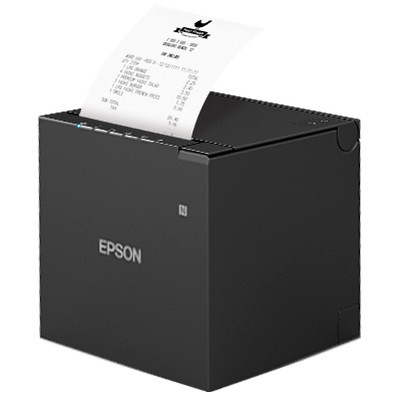
Epson TM-T88VII (USB / Serial / Ethernet) Thermal Receipt Printer (Black)
The Epson TM-T88VII, sold by Epson as the OmniLink TM-T88VII, is the flagship of Epson's 80 mm receipt-printer range and one of the fastest POS printers available, printing at up to 500 mm/s. Built for high-volume retail and hospitality, it pairs that speed with serious durability, a 4-year warranty and broad software support, and connects over built-in USB, RS-232 serial and Ethernet. The power supply is included.
Key features
- Industry-leading speed: up to 500 mm/s direct-thermal printing keeps queues moving at the busiest counters.
- Built for heavy duty: a 70-million-line MCBF, a 200 km printhead and a 3-million-cut auto-cutter, backed by a 4-year warranty.
- Connects to everything wired: built-in USB, RS-232 serial and 10/100 Ethernet for any fixed or networked POS.
- Broad software support: ESC/POS and ePOS emulation with drivers for PC, Mac, iOS and Android, so it fits most POS platforms.
- Server Direct Print: can pull orders straight from a web server for online-ordering setups, with no POS software integration required.
- Lower paper costs: advanced paper-saving functions cut paper use by up to 49%.
- Resilient design: a water-resistant enclosure and drop-in paper loading for demanding service environments.
- Cash-drawer ready: built-in drawer kick-out port to trigger a connected cash drawer.
Specifications
| Brand / Model | Epson TM-T88VII (C31CJ57612) |
| Print method | Direct thermal (no ink or ribbon) |
| Print speed | Up to 500 mm/s (80 mm media, with included PSU) |
| Resolution | 180 dpi |
| Paper width | 80 mm (58 mm selectable); 72 mm print width |
| Max roll diameter | 83 mm |
| Auto-cutter | High-speed, 3 million cuts |
| Reliability | 70 million-line MCBF; 200 km printhead |
| Interfaces | USB, RS-232 Serial, Ethernet 10/100. No built-in Wi-Fi or Bluetooth; Wi-Fi is available with Epson's OT-WL05 USB dongle or the C32C891324 wireless LAN adapter |
| Printer discovery | NFC (Near Field Communication) tap and Simple AP |
| Config build | TM-T88VII-612 (Ethernet + USB + Serial). Epson also builds -622 parallel, -632 powered USB and -652 non-UIB |
| Emulation | ESC/POS and ePOS |
| OS support | PC, Mac, iOS, Android |
| Cash drawer | Drawer kick-out port |
| Dimensions | 145 (W) x 195 (D) x 148 (H) mm |
| Colour | Black |
| Warranty | 4 years |
How it compares
| Model |
Print speed |
Interfaces |
Best for |
| TM-T88VII (this printer) |
500 mm/s |
USB, Serial, Ethernet |
Flagship, high-volume retail |
| TM-m30III |
300 mm/s |
USB, Ethernet, Wi-Fi, Bluetooth |
Compact, tablet & wireless POS |
| TM-T82IV |
250 mm/s |
USB, Serial, Ethernet |
Value / everyday POS |
What's in the box
- Epson TM-T88VII thermal receipt printer (black)
- Power supply (PSU) and power cable
- User guide and warranty card
Frequently asked questions
Will this work with my POS software or system?
The TM-T88VII has broad support: ESC/POS and ePOS emulation with drivers for PC, Mac, iOS and Android, so it works with a wide range of POS software. As with any POS hardware, some cloud POS apps (for example Square) only support specific models, so check this printer against your POS provider's supported-hardware list, or contact our team on 1300 026 062 and we'll confirm compatibility with your setup before you buy.
How do I install and set up the TM-T88VII?
Install the Epson driver (the Advanced Printer Driver or OPOS driver, free from Epson's support site) before connecting the printer by USB. Plugging in the USB cable before the driver is installed is the most common cause of setup and printing problems. For Ethernet, configure the printer with the free Epson TM Utility or in your POS software. If you get stuck, call our team on 1300 026 062.
Is it really the fastest, and how is 500 mm/s achieved?
Yes, the TM-T88VII is one of the fastest receipt printers on the market. The up-to-500 mm/s rating applies when printing on 80 mm media with the supplied Epson power supply, making it ideal for high-volume counters.
Can I upgrade from a TM-T88V or TM-T88VI?
Yes. The TM-T88VII replaces both the TM-T88V and TM-T88VI and is fully compatible with their software, with the same counter footprint, so there's no infrastructure or counter-layout change. The free Epson TM Utility app migrates your existing settings, making it a straightforward drop-in upgrade.
How does it compare to the TM-m30III or TM-T82IV?
The TM-T88VII is the flagship: fastest (500 mm/s) and most durable, for high-volume sites. The
TM-m30III is a compact cube with Wi-Fi/Bluetooth options for tablet and cloud POS, and the
TM-T82IV is the value option for everyday volumes.
What paper does the TM-T88VII use?
Standard 80 mm direct-thermal receipt rolls (58 mm is selectable), up to an 83 mm roll diameter. The common 80 x 80 mm till roll fits perfectly. No ink or ribbon is needed.
Can it open a cash drawer, and what's the warranty?
Yes, it has a built-in cash-drawer kick-out port. The box includes the printer, power supply and cable, user guide and warranty card, and it's backed by a 4-year warranty.
What is the Epson printer model TM-T88VII?
The TM-T88VII is Epson's flagship 80 mm single-station thermal POS receipt printer, and the current generation of the long-running T88 series. Epson markets it as the OmniLink TM-T88VII. It prints at up to 500 mm/s at 180 dpi, which Epson states is the fastest in the industry, and it replaces both the TM-T88V and the TM-T88VI. This listing is the black Ethernet, serial and USB model, Epson part number C31CJ57612, supplied with the power supply and a 4-year warranty.
Is the Epson TM-T88VII Bluetooth?
Not this model. The TM-T88VII sold here (C31CJ57612) has
USB, RS-232 serial and 10/100 Ethernet built in, with no Bluetooth and no Wi-Fi. Wireless is still available as an add-on rather than a different printer: Epson supplies the
OT-WL05 USB wireless dongle and the
C32C891324 wireless LAN adapter for the TM-T88VII, and the printer also supports
NFC tap-to-discover and Simple AP so a phone or tablet can find it without typing in an IP. Call us on 1300 026 062 and we will quote the right adapter. If you specifically want Bluetooth for a tablet or iPad till, the compact
Epson TM-m30III, which has Bluetooth and Wi-Fi built in, is usually the better fit.
What is the difference between the Epson TM-T88VII and the TM-T88VI?
Speed is the headline: the TM-T88VII prints at up to 500 mm/s against roughly 350 mm/s on the TM-T88VI. The VII also lifts durability, with a 70-million-line MCBF, a 200 km printhead and a 3-million-cut auto-cutter, and it carries a 4-year warranty. It adds Server Direct Print for online ordering and paper-saving settings that cut usage by up to 49%. Crucially it is a drop-in: same counter footprint, backward compatible with TM-T88V and TM-T88VI software, so you can swap the hardware without reconfiguring the POS.
How do I set up an Epson TM-T88VII printer?
Install the Epson driver first, then connect the printer. Download the Advanced Printer Driver or the OPOS driver free from Epson's support site and run it before plugging in the USB cable, because connecting first is the most common cause of setup failures. For Ethernet, assign the printer an IP with the free Epson TM Utility app or set the port inside your POS software. The TM Utility also migrates settings across from an existing TM-T88V or TM-T88VI. If you get stuck, call our team on 1300 026 062.
Does the Epson TM-T88VII have NFC?
Yes. There is an NFC tap area on the top of the printer, marked with the NFC logo, and Epson lists NFC as a standard printer discovery method alongside Simple AP. Tapping a phone or tablet against it hands over the printer's connection details, so staff can pair a mobile device without hunting for an IP address or reading a settings label. It is a setup and discovery feature rather than a print path: day-to-day printing still runs over Ethernet, USB or serial on this model.
Application use cases
- High-volume retail: 500 mm/s and a 3-million-cut cutter keep fast-moving checkouts flowing.
- Hospitality & QSR: rapid, reliable receipts and kitchen dockets during peak service.
- Networked multi-till sites: Ethernet lets several lanes or a back-office system share printers.
- Mission-critical POS: the 70-million-line MCBF and 4-year warranty suit sites that can't afford downtime.
The Epson TM-T88VII (model C31CJ57612) is the flagship 80 mm direct-thermal POS receipt printer for high-volume retail and hospitality. This black model prints at up to 500 mm/s at 180 dpi, offers built-in USB, RS-232 serial and Ethernet (no Wi-Fi or Bluetooth), supports ESC/POS and ePOS with PC, Mac, iOS and Android, and is rated for a 70-million-line MCBF, a 200 km printhead and a 3-million-cut auto-cutter. It replaces the TM-T88V and TM-T88VI and is backward-compatible with their software and footprint, adds Server Direct Print and up-to-49% paper saving, includes the power supply, and is backed by a 4-year warranty, shipped Australia-wide by POS Sales Australia.
Brand: Epson · Model: TM-T88VII · SKU: C31CJ57612 · Print method: Direct thermal · Speed: 500 mm/s · Resolution: 180 dpi · Paper: 80 mm · Interfaces: USB / Serial / Ethernet · Emulation: ESC/POS, ePOS · Warranty: 4 years

 1300 026 062